Telegram Number Checker: How to Verify If a Phone Number Is Registered on Telegram
Reviewing the best legitimate methods.
A Telegram number checker is more relevant than ever, with the messaging app recently surpassing one billion users.
Whether you're trying to figure out the fastest channel to reach prospects for your business, or simply getting reconnected with an old friend and want to chat with them via a messaging app rather than inconvenient SMS. Whatever the reason, a reliable way to check if someone has Telegram is an indispensable tool for such situations.
Read this guide to learn what practices the messaging app allows, what it blocks, what changed recently, and how to verify that a number registered on Telegram, without falling for scams or breaking any rules.
What Telegram number checker is
A Telegram number checker refers to Telegram’s built-in feature that determines whether a phone number is associated with an active Telegram account.When people search for how to check a Telegram number, they typically envision a tool or website that provides an instant yes-or-no answer. However, there is noofficial third-party Telegram number lookup tool. There's no official API endpoint for checks, and every third-party site claiming to offer instant Telegram number lookup is either scraping data illegally, using leaked databases, or simply lying to collect your personal details. For a legitimate Telegram phone number check, you must use the Telegram app itself.
How Telegram phone number discovery works
So, how does the Telegram contact check system work? Telegram ties every account to a phone number at registration. However, the public visibility of this association is not that straightforward.
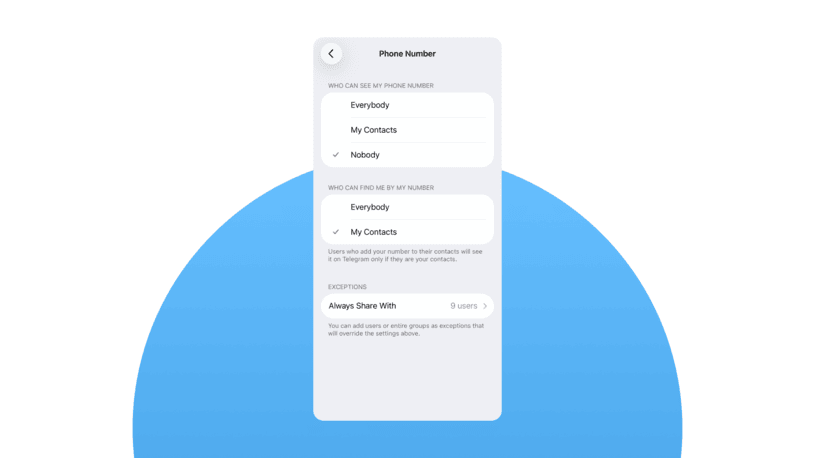
Every Telegram user has control over two separate privacy settings in the app. They are located in “Settings → Privacy and Security → Phone Number”.
- Who can see my phone number — available options: Everybody, My Contacts, or Nobody
- Who can find me by my phone number — available options: Everybody, My Contacts, or Nobody
While the first one controls whether you can see a person’s phone number in their profile, the second option determines whether you can find a Telegram account by phone number. If a Telegram user sets “Who can find me by my phone number” setting to "Nobody," then no method (including contact syncing, searching, or anything else) is going to reveal their account through their phone number. This makes them invisible to number-based discovery on Telegram.
Telegram has been promoting privacy-consciousness as the new normal. Thanks to prompting users toward stricter settings through in-app prompts, a growing number of people now restrict who can find them, limiting discovery via phone number to "My Contacts" or even "Nobody."
In practice, this means more false negatives — just because a search comes back empty doesn't mean the person isn't on Telegram. It may simply mean they've tweaked their privacy settings to avoid their Telegram account being found by their phone number.
Telegram number lookup: legal & working methods
Let’s take a look at the most reliable methods of answering the question: does this number have Telegram or not?
Save the number to your contacts
This remains the single most accurate way to find a Telegram account by phone number at the moment.
1. Open your phone's native Contacts app and create a new contact.
2. Enter the phone number in full international format, country code included. For example, +1 107 443 3210 for a US number.
3. Save the contact with a preferred name.
4. Open Telegram and go to “Settings → Privacy and Security → Data Settings”. Check that the “Sync Contacts” setting is enabled.
5. To force an immediate refresh, you can toggle syncing contacts off, tap "Delete Synced Contacts," then turn syncing back on. This forces Telegram to re-scan your address book.
6. Now open your Telegram Contacts list. Keep in mind that it takes a minute or so to refresh the contact list.
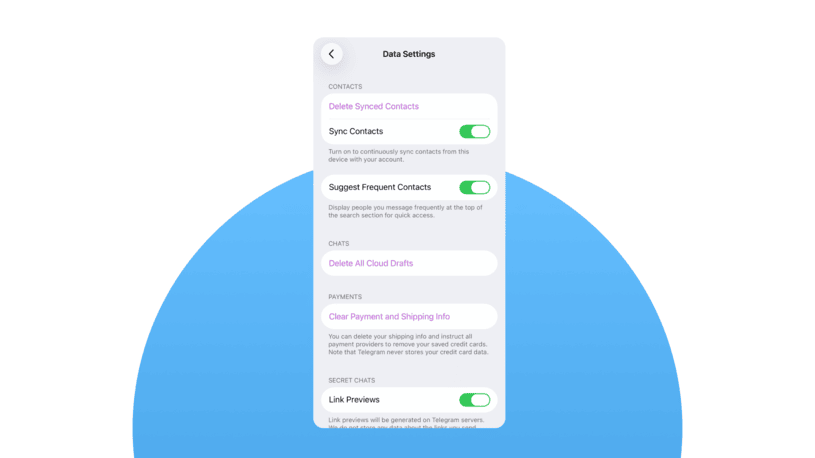
If the number is associated with a Telegram user who permits discovery by contacts, their complete profile will appear in your contacts list, including their display name, profile picture, and last-seen status. You may initiate a conversation immediately. Conversely, if the user is not on Telegram or has disabled discovery, you will see only the contact’s name from your phone, accompanied by an “Invite to Telegram” option.
A practical recommendation: always confirm the number’s format, as an incorrect country code or extraneous digit is the most frequent cause of overlooked profiles.
Start a new conversation directly
This method skips the step of permanently saving the contact.
1. Tap the compose/new message icon in Telegram.
2. Select the «New Contact» option.
3. Enter the phone number in international format.
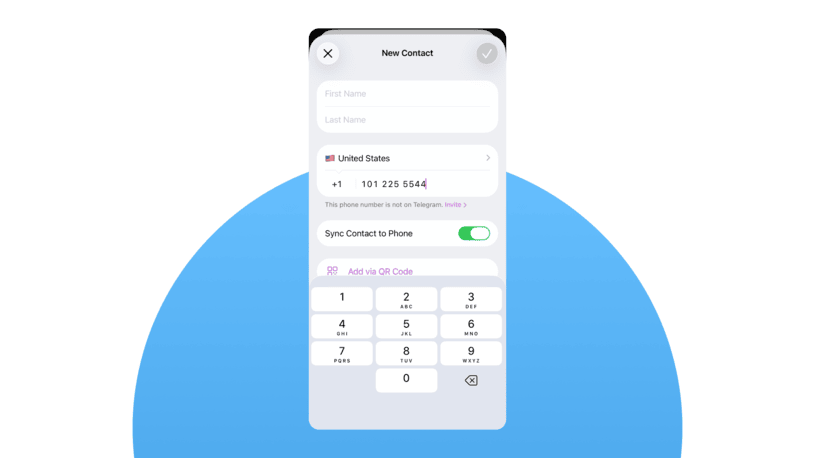
During the number input step, it will either show that the contact is on Telegram or not, and suggest sending an invitation. The latter can mean either that the account doesn’t exist or is non-discoverable.
This approach is handy when you want to do a quick Telegram phone number check without cluttering your address book.
Why some Telegram number checks fail
You may wonder how to know if a number is on Telegram with certainty, but the reality is, you can't always know definitively. A Telegram contact check might fail for various reasons, for instance, privacy settings that limit discoverability, the number being entered inaccurately, the account’s deletion, or the number having recently changed. Importantly, a negative result does not always mean the person is not on Telegram.
Solutions for business
For individuals, when trying to check if someone has Telegram, the methods above are usually fine. But for businesses, manually saving numbers and checking Telegram one by one isn't realistic. You might have thousands of leads in your CRM, and you need a way to effectively reach them on Telegram.
Umnico omnichannel messaging platform brings all your Telegram Personal accounts and Telegram bots into one inbox, letting your team chat with customers, track deals, and automate follow-ups in a single window. You can proactively contact prospects using their phone number or username, track message delivery and read status, and engage entire communities by conversing in group chats. Umnico uses Telegram's official API, so there are no risks of getting your account suspended or hitting annoying traffic limits.

- Every conversation converts into a deal card with customer details, and you can move chats through a customizable sales pipeline from first contact to closed deal.
- Triggers help to send appointment reminders or order updates without human-agent involvement.
- Visual chatbot builder allows users to set up replies to common questions around the clock, qualify leads, and even close sales while the team focuses on complex inquiries.
- Performance analytics track response times and inquiry volumes and provide insights into how the team is actually performing.
- Umnico supports over 25 messaging channels, including WhatsApp, Instagram*, Facebook* Messenger, and others, so you can manage all your customer communication from one place. Forward messages between platforms, keep consistent records, and give customers a seamless experience no matter how they prefer to reach you.
What does not work as Telegram phone number check
Here are some promoted ways to find a Telegram account by phone number that are either illegal or don't really work.
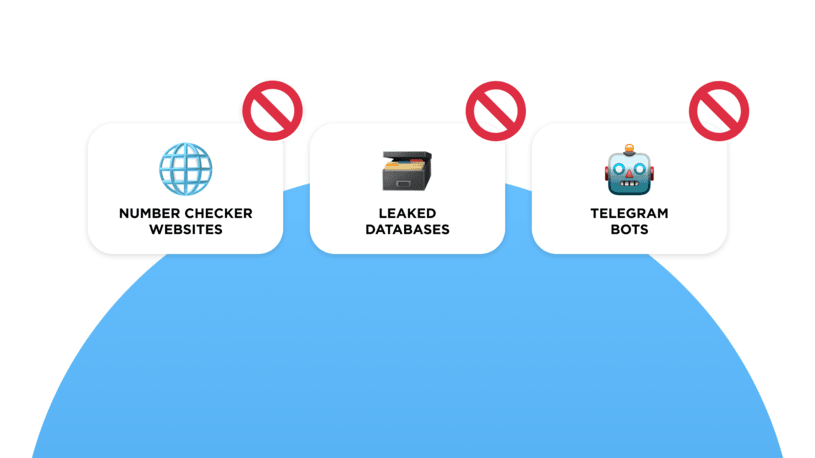
- Telegram checkers on websites and in apps. These have been around for years, and they range from useless to actively harmful. Some harvest the phone numbers you enter. Others show fabricated results to keep you clicking. Always remember that no third-party service has legitimate access to Telegram's user database. If a website promises instant Telegram contact check results, it is a fraud.
- Telegram bots that "verify" numbers. Bots operate within Telegram's platform, and the messaging platform doesn't give bots the ability to look up random phone numbers. Any bot claiming otherwise is either lying or exploiting a vulnerability. And these usually get patched quickly.
- Leaked databases. Back in 2019 and 2022, there were several major Telegram data scrapes, and some sites still provide those old datasets as a means of Telegram number lookups. Most likely, the information is out of date, so relying on stale leaked data is like using a five-year-old phone book to find someone’s current address.
- Reverse username lookups. Finally, if you know someone's Telegram username (the @handle), you can find their profile easily via in-app search, but that won't confirm their phone number. Usernames and phone numbers are separate identifiers in Telegram's system, so anyone can register @handle that is available, and it doesn’t stay linked to their phone number if they decide to change it later.
Frequently asked questions
Here are explanations to some common questions regarding Telegram number checks.
What is a Telegram number checker?
A Telegram number checker is Telegram’s built-in mechanism that determines whether a phone number is linked to an active account, depending on privacy settings.
How can I check if a phone number is registered on Telegram?
To check if a number is registered on Telegram, save it to your contacts and sync with Telegram. If the profile appears, the number is active on Telegram (unless privacy restrictions apply).
Can I find a Telegram account by phone number?
Yes, but only if the account owner allows discoverability. If privacy settings restrict visibility, a Telegram number lookup will not show the account.
How do I know if someone has Telegram without messaging them?
Add the number to your contacts and sync Telegram. If the profile appears, the person uses Telegram. If not, the person either hasn’t registered the number or their privacy settings prevent discovery.
Summing things up
If you're searching for a Telegram number checker in 2026, keep in mind that the only reliable way to check Telegram number status is inside the Telegram app itself, as there is no legitimate external Telegram number lookup tool.
For occasional personal checks, the explained in-app methods work perfectly, while businesses are better off using dedicated tools to connect and manage Telegram accounts effectively. For example, Umnico Inbox
You might also be interested in the following topics



Subscribe to Umnico news!
Be the first to get recommendations and up-to-date information